
Why I Built It, How It Works, and What’s Coming Next
For the longest time, my diecast collection lived everywhere except in one proper place. A few cars were in Google Photos. Some were in random folders on my Mac. Some on Whatsapp chats Specs were in notes… somewhere. A couple of spreadsheets existed but never got updated. And the rest lived only in my head.
Every collector hits this point eventually, the moment where your collection grows big enough that you need a proper system, not just a gallery. Something searchable, organized, fast, and actually pleasant to use.
That’s where this project started.
I didn’t want another “photo dump” website. I wanted a collection system. Something that:
- Organizes cars by serial
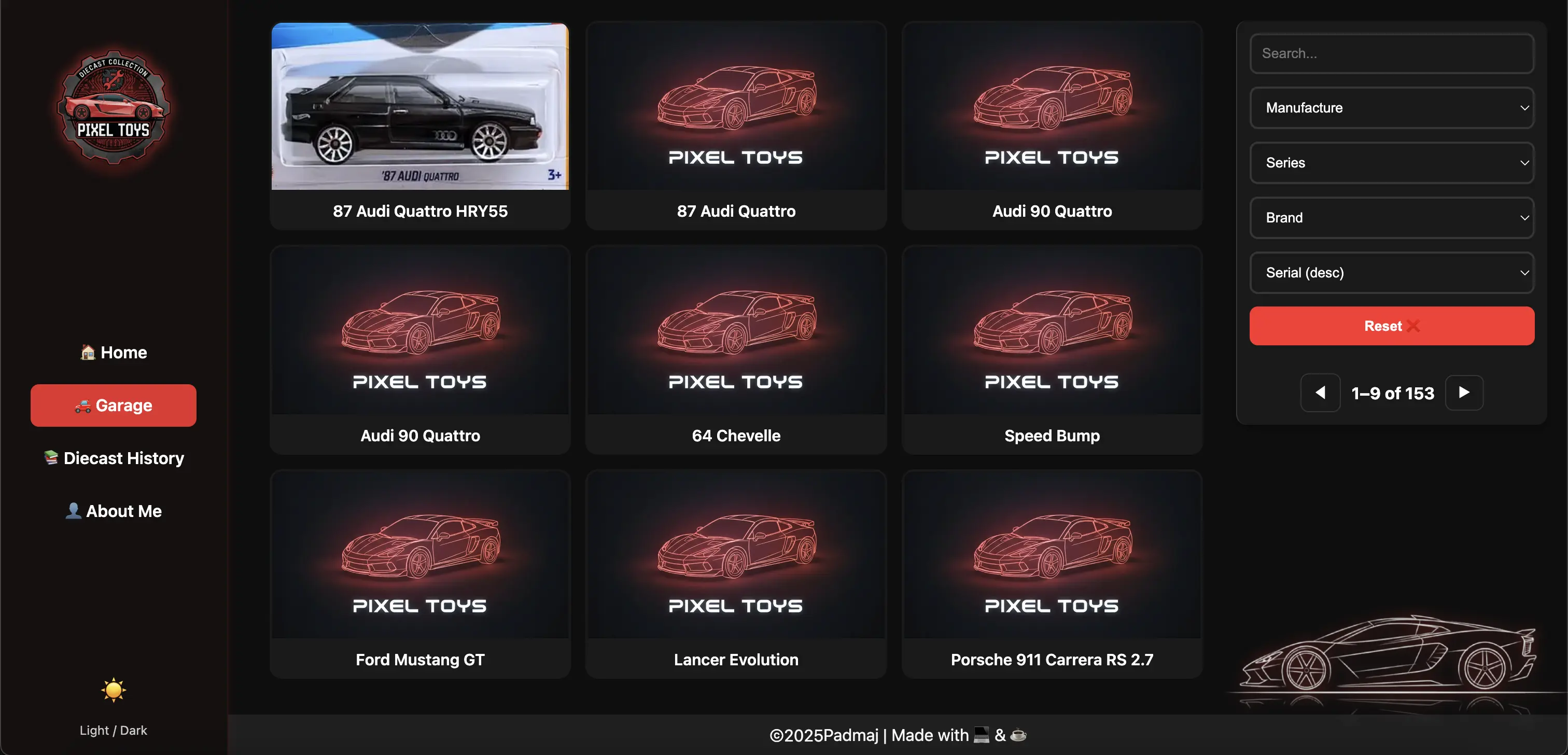
- Handles multiple images per model
- Stores brand, year, series, colour
- Supports a special “featured” hero image
- Tracks who gifted which models
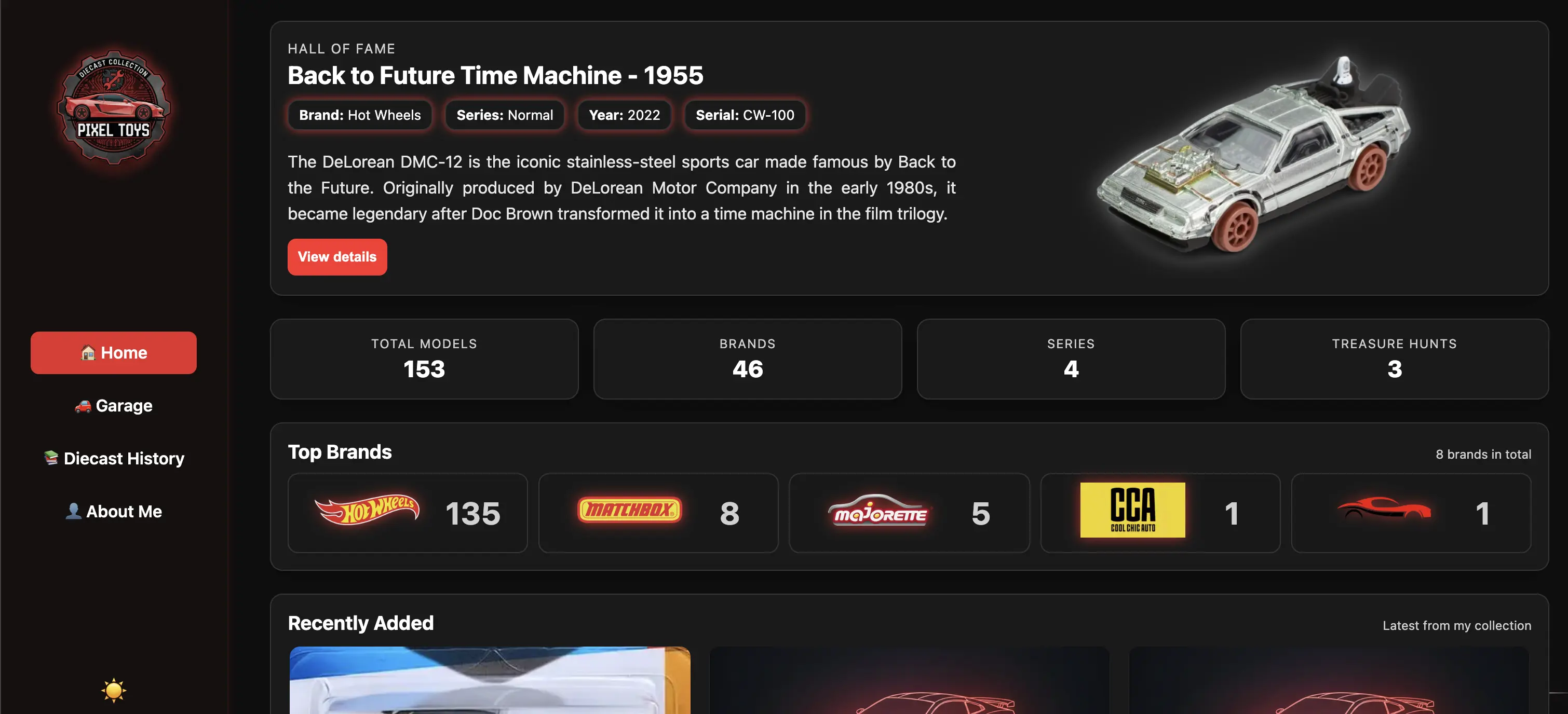
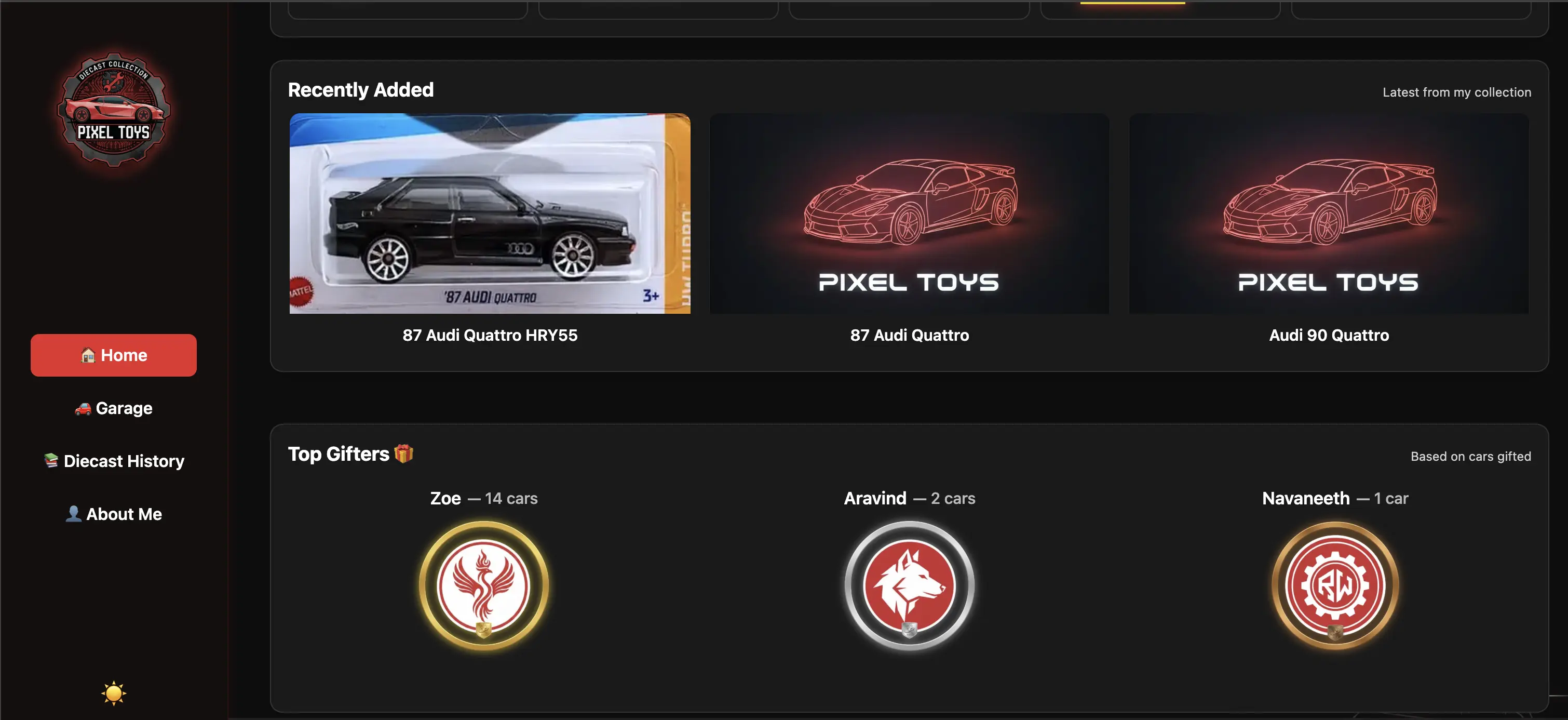
- Shows stats, counts, and recently added cars
- Works seamlessly on mobile
- Loads fast even with high-quality images
- And most importantly, is automated end-to-end
Because honestly: I don’t want to manually resize images, convert formats, paste URLs, or build JSON files every time I buy a new car.
Now, all I do is:
- Drop images into GitHub
- Fill metadata in Google Sheets
…and everything else happens automatically. So I built my own system. - My Diecast Collection
Why Build Instead of Using a CMS?
Of course, I tried the usual suspects:
- Notion
- Inventory apps
- WordPress plugins
They worked… until they didn’t, The moment you want:
- multi-image support
- custom naming conventions
- actual hero images
- gifter statistics
- proper UI design
- hosting on your own domain
- fast performance
- your own workflow
These platforms fall apart. So it became obvious: A custom system made more sense.
My collection, my rules.
Architecture — How Everything Fits Together
From day one, I didn’t want a heavy backend or overly complicated stack. I wanted something clean, predictable, and fun to maintain… without servers, APIs, logins, or WordPress-like headaches.
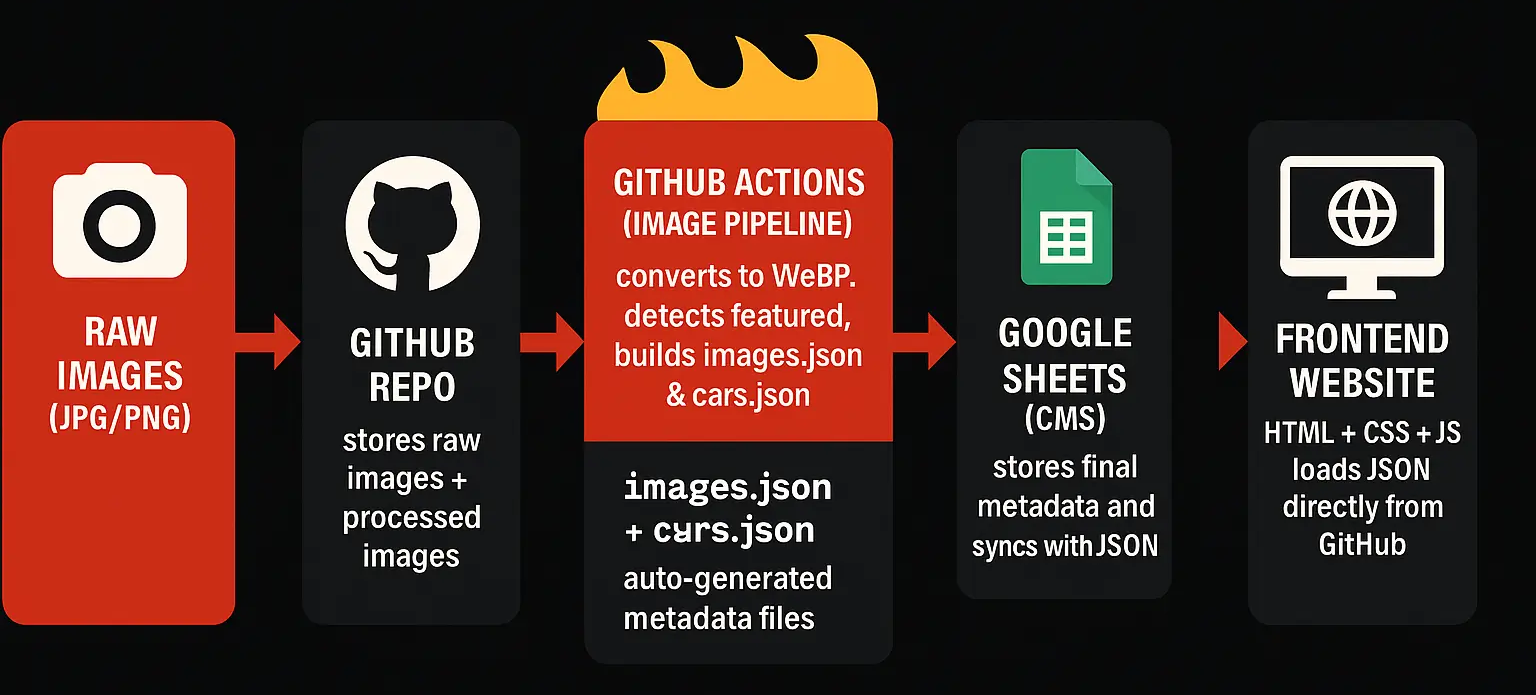
So the architecture naturally evolved into a powerful, simple triangle:
GitHub → Google Sheets → Frontend
No backend servers.No Firestore.No SQL.
Just three services doing exactly what they’re best at.
1️⃣ GitHub → Source of Truth for Images & JSON
All images live directly inside the repo. Whenever I drop new files into /images/new/ and push:

- GitHub Actions picks them up
- detects serial & featured images
- converts everything to WebP
- keeps featured PNG untouched
- moves them into the correct folder
- rebuilds data/images.json
- commits changes automatically
GitHub isn’t just storage, it’s the engine that formats, standardizes, and prepares my entire collection. No S3. No Firebase Storage. No CDN configuration. Just GitHub and a workflow file.
2️⃣ Google Sheets → My CMS (The Brain)
Typing metadata inside GitHub or JSON files would be painful.

Google Sheets is perfect because:
- it’s fast
- easy to clean / filter
- mobile & desktop friendly
- supports formulas
- versioning is automatic
I wrote Apps Script functions that:
- pull the latest images.json
- update image URLs in the sheet
- regenerate cars.json
- sync everything back to GitHub
Sheets became my CMS, simple and extremely effective.
3️⃣ Frontend → Pure HTML + CSS + JavaScript
I made a conscious choice to avoid React, Vue, Angular, or anything heavy. Not because I dislike them, but because I wanted:
- zero dependencies
- instant load times
- no build steps
- easy Firebase hosting
- full UI control
- clean, reusable code
The entire site runs on:
- HTML5 (structure)
- CSS (glassmorphism + Hot Wheels theme)
- Vanilla JS (filters, modal, hero carousel, rendering)
No frameworks.No libraries.Just simple, beautiful code I can edit two years from now.
Putting It All Together (The Flow)
Here’s the full loop, end-to-end:
- I drop raw photos into /images/new/.
- I push to GitHub.
- GitHub Actions optimizes images → updates images.json.
- Google Sheets fetches the JSON → updates URLs.
- I run syncJSON() → which rebuilds cars.json.
- Frontend loads the fresh JSON instantly.
No manual resizing. No manual JSON editing. No traditional database. Just drag → push → sync → done.
Solving the Image Problem (WebP to the rescue)
At first I uploaded JPGs and PNGs. But quickly realized:

- Large JPGs kill performance
- PNGs are heavy
- Multiple angles explode file size
- Featured images need to remain crisp
- I don’t want to manually optimize anything
So I built an image automation pipeline using GitHub Actions. Now the rules are simple:
✔ Normal images → auto-convert to WebP✔ Featured images → stay PNG✔ Multiple images → auto-group under the same serial
This alone made the whole app extremely fast, and made my workflow effortless.
Naming Rules — The Backbone of the Automation
My entire pipeline runs on one simple, strict naming convention:
Normal - For images of cars
<name>-CW-<serial>.jpgMultiple angles - Multiple images can be uploaded for a single car
<name>-CW-<serial>-2.jpg
<name>-CW-<serial>-3.webpFeatured - Image to be used on the hero banner for the featured car
<name>-CW-<serial>-featured.pngGitHub Actions reads this, understands what to convert, what to leave untouched, and how to group images.
No guesswork.No mismatched filenames.Everything stays predictable.
The Workflow — Fully Automated End-to-End
After a lot of tinkering, this is the final workflow that works perfectly:
Step 1 — Add images
images/new/Step 2 — Push to GitHub
git add .
git commit -m "new images"
git pushStep 3 — GitHub Action takes over
It automatically:
- detects serial
- converts images → WebP
- leaves featured PNG untouched
- moves optimized files
- generates images.json
- commits everything back
Step 4 — Google Sheets Sync

In my Sheet, I click my custom menu item:🔥 Diecast Tools → Run Full Sync
This:
- fetches images.json
- updates columns (L & O)
- rebuilds cars.json with all metadata
Step 5 — Website updates instantly
The frontend reads data directly from GitHub’s raw JSON.
No manual JSON editing.No uploading files.No database issues.
Just drag → push → done.
The Frontend — A Clean, Glass UI for Collectors
I wanted the site to feel like a proper collection app, not a blog template.Here’s what the current version includes:
✔ Hero Section
- rotates featured cars
- mobile swipe support
- arrows inside the image
- no layout jumps
✔ StatsTotal cars, brands, gifters, etc.
✔ Top BrandsAuto-counted from JSON.
✔ Recently AddedSorted by latest serial.
✔ Top GiftersA fun ranking system.
✔ Car Details Modal
- image carousel
- brand logo
- tags
- description
- shareable URLs
- toast notifications
- fully responsive
✔ Mobile NavigationA bottom menu bar that feels like an app.
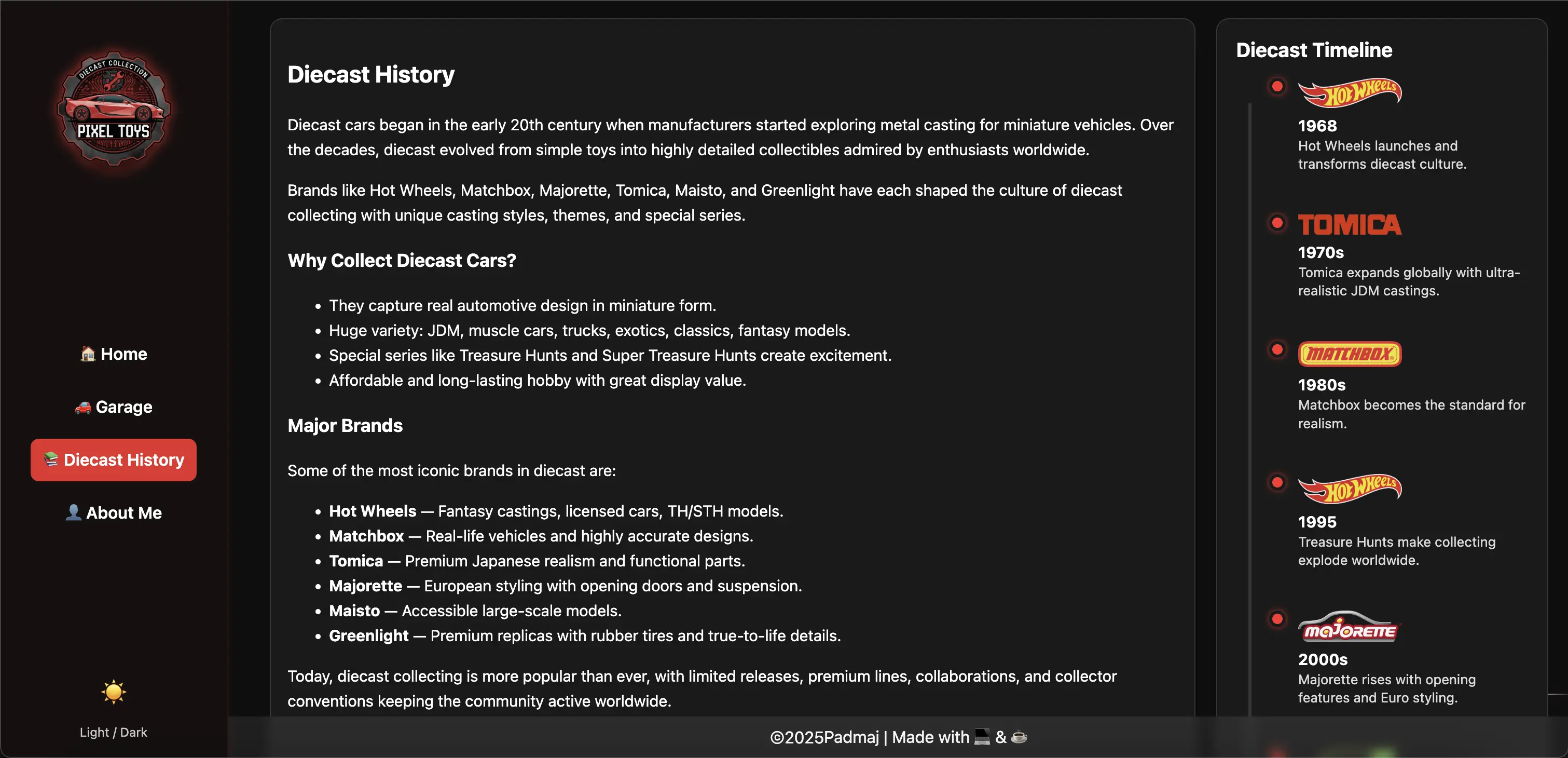
✔ About Me PageCircular DP, socials, clean layout. All written in vanilla HTML/CSS/JS — giving me full control over responsiveness and animations.
Why GitHub + Sheets Instead of a Backend?
Building a backend would require:
- hosting
- APIs
- authentication
- database migrations
- and ongoing maintenance
For a personal passion project, that’s unnecessary.
With GitHub + Sheets:
- hosting is free
- updates propagate instantly
- no servers to maintain
- Sheets works as a simple CMS
- GitHub handles image versioning
- automation handles everything else
It’s the perfect balance of power and simplicity.
Phase 1: Complete
Phase 1 delivered everything I wanted:
✔ Full collection system✔ Glass UI with Hot Wheels theme✔ Automated WebP conversion✔ Strict naming rules✔ GitHub-driven image backend✔ Google Sheets as CMS✔ Share button + auto-open modal✔ About Me page✔ Bottom navigation✔ Responsive on all screens✔ Zero manual JSON editing
It feels complete.It feels like my collection.
Open-Sourcing the Whole System
Once Phase 1 is completely stable, I’ll be making the entire GitHub repo public. Everything, the automation workflow, image pipeline, JSON structure, Sheets scripts, and frontend code. will be open for anyone to fork or reuse.
I built this for myself, but I know a lot of collectors struggle with the same pain points. If this setup helps even one more collector organize their own cars better, that’s a win.
Phase 2: What’s Coming Next
After early feedback from friends, and the features I wanted next, here’s the roadmap:
🔹 Wishlist / “Cars I Want”A public wishboard.
🔹 Better Search (possibly Algolia)Instant filtering across all models.
🔹 Sorting modesBy brand, year, name, serial.
🔹 Grouping variantsAll Skyline R32 models under one group.
🔹 FavouritesLocalStorage hearts.
🔹 Admin Upload UIDrag-and-drop from the browser.
🔹 Gifter pagesDedicated pages per contributor.
Copyright Notice
Author: Padmaj P Kumar
Link: https://blog.padmajp.com/posts/building-my-diecast-collection-system/
License: CC BY-NC-SA 4.0
This work is licensed under a Creative Commons Attribution-NonCommercial-ShareAlike 4.0 International License. Please attribute the source, use non-commercially, and maintain the same license.
Table of Contents
Start searching
Enter keywords to search articles
Comments